Showing posts with label Free Softwares. Show all posts

Saturday, August 22, 2009

How to increase Download Speed of μTorrent!

utorrent_png_by_magog64µTorrent is a freeware closed source BitTorrent client by BitTorrent, Inc. Its a most popular Bittorrent client but very few peoples know how to set up μTorrent for maximum performance and be able to download faster. To facilitate this there are several tools that with just 1 click can accelerate μTorrent to download and upload faster.

I am listing here four tools which will help you to imrove the download speed of uTorrent.

1) µTorrent Acceleration Tool :

uTorrent Acceleration Tool is a tool that is basically makes changes in the configuration of µTorrent to download torrents faster, this is done through an algorithm that, depending on the configuration of your Internet connection, the connection type and looking for some parameters optimizes the configuration.

Link : Download μTorrent Acceleration Tool.

2) uTorrent EZ Booster


μTorrent EZ Booster is a tool that does exactly the same as Acceleration Tool.

Link : Download uTorrent EZ Booster.

3)uTorrent SpeedUp PRO :


μTorrent SpeedUp PRO is the same as all these tools, their method of operation is the same but has the characteristic that is lighter and does not display the graphical statistics connection.

Link to download uTorrent SpeedUp PRO.

4) uTorrent Ultra Accelerator


μTorrent Ultra Accelerator is another clone of these programs to accelerate the download speed of μTorrent, but you can see in the screenshot does not include graphical statistics.

Link : Download uTorrent Ultra Accelerator.

Hope this tools will help you to improve your downloading speed. Just give it a try and drop your comments here. Thanks

How to Remove the ‘Send Feedback’ link in Windows 7

windows_7_logo_refreshed_by_janek2012

Yesterday i install Windows Seven beta version. I like the visual appearance too much. I noticed one thing that Windows 7 team places a Send Feedback link in the top right corner of every opened windows titlebar. I am writing here a simple tutorial which will guide you to remove the ’send feedback’ link in very few easy steps.

Screenshot (Before):

send-feedback

Follow the simple steps to remove the link :

Step 1 : Go to Start > Run > Enter Regedit

Step 2 : Navigate to the key: HKEY_CURRENT_USER\Control Panel\Desktop.

Step 3 : Right-click on the right pane and select New -> DWORD (32-bit) value. Name the new value FeedbackToolEnabled and set it’s value to 0.

edit_feedback

Step 4 : Restart your machine.

Once you do this all of the “Send Feedback” links will be removed from the Windows 7 title bars.

Screenshot After :

titlebar

Give it a try if you are using windows 7 beta. And don’t forget to drop your comments if you like my post

Send SMS Online from Your Excel Sheet.

SMS_by_sarakhanoom

Now you can directly send SMS to your friends, clients via Microsoft Excel sheet using My SMS Mantra.Mysmsmantra SMS plug-in for Microsoft Excel is ideal for direct marketing applications. Just import your data into Microsoft Excel, set up an SMS message template and we will do the rest! The SMS plug-in will add the message to each of the mobile phone numbers in the list and send each of them the same text message.

Features :

  • Single and Bulk Text Messaging
  • Bulk SMS directly from Excel with customizable speed & sender id.
  • Developer API(You can integrate SMS Solution with your software and can be automated)
  • Grouping Functionality
  • Single click SMS delivery to thousands of numbers.

It allows you to contact large numbers of people in seconds. SMS plug-in for Excel is the easiest way to send out bulk SMS messages from a desktop application which most staff will likely be familiar with and have installed on their desktop PC’s.

Screenshots :

http://www.mysmsmantra.com/images/smsxl.jpg

http://www.mysmsmantra.com/images/rightClick.jpg

SMS-Excel Plugin seamlessly integrates with Microsoft Excel and enables you to send SMS to mobile phones all over india from your PC using Microsoft Excel. You need Microsoft .NET Framework to install this software.

Links : Homepage | Download MySMSMantra Excel Plugin | Watch Live Demo

Free Avira AntiVir Premium License For 6 months

Avira Antivir anti-virus software has always been a very popular and effiicent anti-virus in recent years. So here is a mouth watering deal for you. Avira Antivir Premium, which usually costs a good lot of bucks, is actually free for 180 days! In a promotional offer they are keeping it for free for six months. Grab a free 6 months Avira AntiVir PersonalEdition Premium license now by filling up the form.

You can get a Free 6 months key for Avira Antivir Premium by following the steps below:

1. Go to Avira Promotional Site.

2. Fill in your details as shown below and click on Lizenz Anfordem.

3. Then click on Lizenzubersicht to get the license key, by clicking the key icon.

4. Now Download Avira and Enter the key to use it for 6 months.


How to Load a license Key ??

1. Check your email, you should receive a mail from Avira. Open the mail and find your attachment named “HBEDV.KEY“. This is your license key. Observe that this license is only valid for 6 months, and it already mention the expire date for this license key.

2.Install Avira AntiVir PersonalEdition. After installation complete, go to Help -> Load license file… and select the license file which you just received. Done.

If you like this post then don’t forget to drop your comments here

BitDefender Total Security 2009 Genuine License for 6 months

BitDefender Total security is another sensitive security suite to protect your computer from all Internet security threats, along with system maintenance and backup, without slowing down your PCs.

Features :

  1. Confidently download, share and open files from friends, family, co-workers – and even total strangers!
  2. Protect your identity: shop, bank, listen, watch privately and securely
  3. Guard your conversations with top-of-the line encryption
  4. Connect securely to any network at home, in the office or away
  5. Protect your family and their computers!
  6. Get fine-tuned performance from your computer !

A genuine License of BitDefender Total security will cost you $69.95 for one year single PC user. Trial period offered is 30 days so, ater the expiry of trial period, you can extend its license by using following steps.

If you are in Germany, go directly to the promotional page otherwise use German proxy to get the license for free.

1. Go to http://www.proxy-service.de

2. Follow any of the given promotional link

http://www.bitdefender.de/site/Promotions/pcgots2009

http://www.bitdefender.de/site/Promotions/pcmag2009

3. Fill the Form as per :

bit-defender-2009-free-license

4. Check your email for 20 digit Genuine License key

5. Download BitDefender Total security 2009 (if you don’t have) and enter that key when prompted on registration wizard to get 180 days / Months License.

If you like this post then don’t forget to drop your comments here

15 Must Have Free Softwares for a New Computer

The hard drive received a full format, Windows XP/Vista/7 has finished installing, and now it’s time to decide what to install next. Whatever you do, don’t allow that PC to touch the Internet before finishing it off with the most important updates and applications.Friends sometimes ask me what software they should install on their PC. So i am posting some important software list here.

For best results, install these freebies before you install any other applications :

1- Keep viruses away with Avira Antivirus. [download ]
First things first. One of the best software to install for a newly bought PC is an antivirus. Avira provides one of the most reliable, popular and free antivirus protection out there.

2- Remove trial software with PC Decrapifier. [download]
Some of the most major computer brands out there are shipped to consumers with annoying, trial based software. If you want to remove them a.s.a.p, this one is essential.

3- Keep spywares at bay with Spyware Terminator. [download]
Virus protection? Check. Spyware protection with removal and real-time scanning capabilities? Let this terminator works its wonders.

4- Remove junk items from your hard disk with CCleaner. [download]
CCleaner removes unused files effectively and keeps your hard disk clean from junk items. As a bonus, it comes with system optimization and privacy protection capabilities.

5- Defragment your hard drive in real time with IOBIT Smart Defrag. [download]
Fed-up with the ineffective default Windows defragmenter? Use this tool to defrag your hard disk in real time without having to stop your work each time you want to optimize your hard drive.

6- Proactively protect your computer with Spyware Blaster. [download]
Double up your computer protection from spyware attacks with this tool. Keep this one constantly updated to keep your system spyware-free.

7- Tweak and optimize your Windows capabilities with Fresh UI. [download]
Looking for an easy way to tweak your system without having to dive into manual registry editing? The ultimate registry tool for dummies (and experts too!)

8- Minimize hacker threats with ZoneAlarm Firewall. [download]
Protect your DSL or cable connected computer from malicious Internet users with this popular, excellent personal free computer firewall.

9- Delete important files and folders securely with File Shredder. [download]
Always remember that files that you remove via the recycle bin can still be recovered, if the disk sections have not been overwritten. To delete (and shred!) sensitive files permanently, this tool is an obvious choice.

10- Encrypt your data with TrueCrypt. [download]
One of the safest ways to secure sensitive files on a hard disk is to encrypt it with a secure password and algorithm. Even a noob can do it with TrueCrypt. Ridiculously useful.

11- Backup important files online with Dropbox. [download]
The Dropbox client allows you to effortlessly save, access and sync 2GB of important files between your computer and a free online backup server. Never lose any essential documents again!

12- Recover accidentally deleted files with Recuva. [download]
Does what it says above. A nice tool to have during difficult times.

13- Easily hide folders with Free Hide Folder. [download]
Looking to hide that important files and folders easily with an easy to use interface? Look no further, Free Hide Folder is here!

14:Firefox: A great alternative browser, and it’s less hacked/attacked than Internet Explorer.[download]

15:Trillian: The ultimate all-in-one instant messenger/IRC client.[download]

10 Best Firefox Add-ons For Better Tab Management

The tab is easily one of the most used feature in Firefox. It gives you the convenience of browsing different sites in one single window and save you the trouble of too many windows cluttering your desktop. If you are like me, who like to open many tabs at the same time, here are 10 useful extensions that you can use to better manage your tabs.

1) Tab Mix Plus (TMP)

Tab Mix Plus is probably the best, if not, one of the best Firefox tabs extension around. It extends your tab function in many way that you never think is possible. With TMP, you can duplicate tabs, control tab focus, tab clicking options, undo closed tabs and windows, and many more useful features. In fact, if you take a look at the database of Firefox extension, some of the tab extensions have long been included as a feature in TMP.

Alternative to TMP: Tab kit

tab-kit

If you don’t like TMP for the reason that it conflicts with some other extension, a great alternative will be Tab Kit. Tab Kit is another extension that gives you a great deal of control over your tabs. It allows you to group your tabs according to domain or parent tab and arrange your tabs in multiple rows. You can also shift your tab bar to the top/left/right of the window and also copy/paste/duplicate group of tabs by dragging. Tab kit is not compatible with TMP.

2) TooManyTabs

Too many Tabs

TooManyTabs is an experimental Firefox addon. It allows you store up to over 50 tabs without cluttering up your tab bar. TooManyTabs uses an extra rows just below your bookmark bar to store the tabs. Whenever you move a tab to TooManyTabs, the memory is freed up and can be allocated for other use. This helps to prevent your Firefox from consuming too much memory from idling tabs.

3) Quick Drag

Quick Drag is an extension of the popular SuperDragAndGo extension. You can easily drag and drop any images, highlight texts or links within the browser to open them in new tab. When highlighted texts are dragged and dropped, it will perform a Web search with the selected text on a new tab. Dragging and dropping an image will save the image to your Desktop.

4) Tab Split Tab

tab split tab

Opera users will know that you can easily split the browser into vertical, horizontal, cascade tiles for viewing of multiple tabs concurrently. Tab Split Tab is an experimental addon that aims to fulfill the same window splitting task in Opera. At the moment, you can split your Firefox browser into two and view multiple sites in one page.

5) Morning Coffee

morning coffee

Morning coffee allows you to bookmark your frequently visit sites and open them all with one click. What is unique about this extension is that it allows you to choose which bookmarks to open on each day. There might be some sites that are updated weekly and you don’t want to visit them every day. By defining the day that you want to visit the sites, Morning Coffee adds the sites to the appropriate day and load them all up when that day arrives.

6) Tab Catalog

tab-catalog

Tab catalog displays a thumbnail of all the tab on a canvas so that you can choose and load up the tab you want. This is useful when you have too many opened tab and can’t make out which is which. There are several ways to display the thumbnail canvas, either press Ctrl + tab, mouseover the Tab-Catalog button or press the view all tab button at the right of the tab bar.

Alternative to Tab Catalog: Firefox Showcase

Firefox-showcase

Firefox showcase is another extension that displays a thumbnail of all the opened tab. You can choose to load the thumbnail in a new tab, or in a new window. Though functionally the same as Tab catalog, Firefox showcase does provide you with more configuration options to personalize your thumbnail, such as setting the size, thumbnail caching, thumbnail updating time etc.

7) Aging Tab

Aging tab

This extension make the inactive tab fade as time passes and at the same time highlight the active tab making it more distinguishable. Custom colors can be configured for the aged and active tab.

Alternative to Aging Tab: Colorful Tab

Colorful Tabs

Colorful Tabs paints each tab with different color and make them easy to distinguish. The latest version comes with a default black background that many come to hate. Luckily, one can easily switch off the background from the Preferences page.

8) Fish Eye Tab

FishEyeTab

If you open too many tabs at one time (more than 20), you will find that each of your tab become barely visible. What Fish Eye Tab does is to zoom and expand each tab to display the tab label as you mouseover it. Fish Eye Tab is activated only when the number of tabs exceed the width of the Firefox window.

9) FaviconizeTab

FaviconizeTab

This extension replace the usual tab with the site favicon, thus reducing the width of the tab. With FaviconizeTab, you can squeeze more tabs into the tab bar without it looking messy and untidy.

10) Source Viewer Tab (for web developer)

Source Viewer Tab

This last one is actually my personal favorite. Being someone who did a lot of coding, I find it a chore to switch between windows just to view the source of a Web page. This Source Viewer Tab is able to open the source in a tab rather than in a new window.

There are plenty of other tab management extension in the Mozilla database. Which one did you use to manage your tab?

Convert PDF file to Microsoft Word Format with PDF to Word Converter!

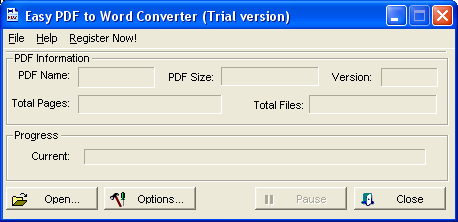
Do you want convert a PDF file to Ms Word format, you can use “Easy PDF to Word Converter” software. “Easy PDF to Word Converter” software enable export the text, images and other contents from pdf document into word document, so you can reuse your PDF content. This software will preserving text, layout and bitmap images in the generated word document.

Features of PDF to Word Converter software

  • Converts PDF files into Microsoft Word RTF format
  • Standalone software, to run this software does not require MS Word, Adobe Acrobat and Reader program.
  • Processes the conversion with very high speed
  • Automatically resize pdf page to fit your requirement
  • Accurately preserves Text, Pictures, and Layout
  • Supports multiple document conversions (Batch Processing)
  • Supports drag and drop files and batch conversion
  • Supports PDF1.5 protocol (formerly only supported by Acrobat 6.0)
  • Converted files can be automatically loaded immediately after conversion complete
  • Supports Page ranges (all, from to, individual pages)
  • Supports Win98/ME/NT/2000/XP platforms. For windows vista i don’t know, have available or not.
  • U ser friendly and easy to use

How to Use it ??

  1. Start “Easy PDF to Word Converter” from Windows Programs menu.
  2. Click the “Open…” button and the From the “Open PDF Files” dialog, select one or more PDF files. Or click File menu and then choose Open.
  3. Choose the output directory from the “Save as” Dialog.
  4. Easy PDF to Word Converter start converting PDF files to word rtf files. You can click “Pause” button to pause the process, then click “Resume” button to resume the process. Or you can click “Stop” button to stop converting at any time.

Note : Easy PDF to Word Converter (pdf to word) is shareware, the trail version of Easy PDF to Word Converter (pdf to word) can only let you convert up to 5 pages in one PDF documents. If you want to convert more, you must register it.

This software can be download from this link : Easy PDF Converters Home Page

Recover Deleted Files and Folders with Recuva

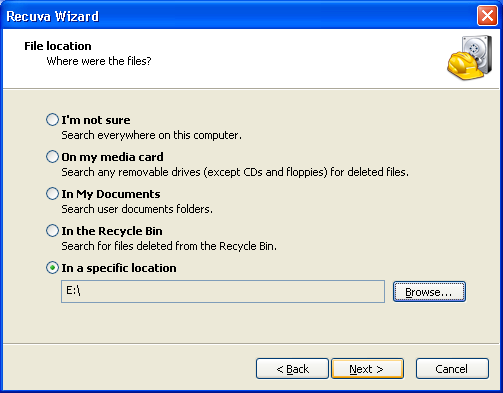
In this time many software recovery available in internet, but most of the programs not free, so several facilities of softwares reduced or locked if you use free version or trial version. if you want free program recovery may be Recuva the solution. this software is support in memory card and USB drive.

I have tried this software and can detect and recover deleted file from my Flasdisk. And the excitement of recuve can detect 4 secure deletion that is, simple overwrite, DOD, NSA and Gutmann methode.

How use it :

  • Download and install recuva software. Recuva software from link under this article. Install the software and run it.
  • Select file type to be recovered. if you want to recover all file select other then click next.

  • Select where the file location wishing you recover then click next and then click start to scan your drive.

  • After process of scan finish, select/check the file that you want to recover then click recover button.

Download Link Reciva software :

Link : Download Recuva

nternet Explorer 8 RC1 available for Download!!

Microsoft has released latest version of its internet browser Internet Explorer 8 Release Candidate 1. Internet Explorer which still is the most used browser in the world with almost 45% of market share. However, Firefox is giving them a very tough competition and for this reason Microsoft is trying their level best to maintain their position.

This latest release of Internet Explorer 8 RC1 has lots of modifications and feature upgrade such as:
  1. Faster browsing experience with ability to open new pages and tabs more fastly.
  2. More Secure which protects your PC from malicious viruses.
  3. Easier and user friendly interface which makes your browsing experience more minimalist.
  4. Privacy on another level, which gives you complete privacy while you are browsing.

ie-8-rc1

Internet Explorer 8 Release Candidate 1 is available Windows XP and Win Vista.


Download :

1) Internet Explorer 8 RC 1 for Windows XP

2) Internet Explorer 8 RC 1 for Windows Vista 32-bit

3) Internet Explorer 8 RC 1 for Windows Vista 64-bit

Free RapidShare Premium Accounts For Bloggers And Webmasters!

Here is a good opportunity for bloggers and webmasters to get Rapidshare Premium Accounts for free. GeniusHackers.Com, a blog about Windows tips and productivity hacks is giving away premium accounts to bloggers and webmasters.

To get Rapidshare Premium account, you have to post about this contest on your blog or website and after that mail GeniusHackers with the link to your post using the contact form given here. You will get the premium account with user name and password in your email inbox.

Rapidshare is one of the world’s largest file-hosting sites with millions of files stored on its servers. According to Alexa, Rapidshare.com is currently the 12th most visited website globally.

Link : RapidShare premium accounts for bloggers and webmasters.

Download Need for Speed: Undercover Reloaded | 2008


System Requirements
OS: Windows XP/VISTA with latest service pack
Processor: Intel Pentium 4 (or equivalent) CPU running at 2.8GHz or higher*
Memory: 1GB RAM
Video Card: Geforce 6500, Radeon 9500 or better DirectX compliant video card**
Hard Drive: 5.5 GB required to install game

Optical drive: 8X or faster DVD Drive
Sound card: DirectX compatible sound card
Internet: To play online a network card is required for broadband connectivity

* 3.0GHz if running Windows Vista
** with Pixel shader 2.0 or above (AGP and PCIe only)

Don't forget to comment Here if you like my post

15 Must Have Free Softwares for a New Computer

The hard drive received a full format, Windows XP/Vista/7 has finished installing, and now it’s time to decide what to install next. Whatever you do, don’t allow that PC to touch the Internet before finishing it off with the most important updates and applications.Friends sometimes ask me what software they should install on their PC. So i am posting some important software list here.

For best results, install these freebies before you install any other applications :

1- Keep viruses away with Avira Antivirus. [download ]
First things first. One of the best software to install for a newly bought PC is an antivirus. Avira provides one of the most reliable, popular and free antivirus protection out there.

2- Remove trial software with PC Decrapifier. [download]
Some of the most major computer brands out there are shipped to consumers with annoying, trial based software. If you want to remove them a.s.a.p, this one is essential.

3- Keep spywares at bay with Spyware Terminator. [download]
Virus protection? Check. Spyware protection with removal and real-time scanning capabilities? Let this terminator works its wonders.

4- Remove junk items from your hard disk with CCleaner. [download]
CCleaner removes unused files effectively and keeps your hard disk clean from junk items. As a bonus, it comes with system optimization and privacy protection capabilities.

5- Defragment your hard drive in real time with IOBIT Smart Defrag. [download]
Fed-up with the ineffective default Windows defragmenter? Use this tool to defrag your hard disk in real time without having to stop your work each time you want to optimize your hard drive.

6- Proactively protect your computer with Spyware Blaster. [download]
Double up your computer protection from spyware attacks with this tool. Keep this one constantly updated to keep your system spyware-free.

7- Tweak and optimize your Windows capabilities with Fresh UI. [download]
Looking for an easy way to tweak your system without having to dive into manual registry editing? The ultimate registry tool for dummies (and experts too!)

8- Minimize hacker threats with ZoneAlarm Firewall. [download]
Protect your DSL or cable connected computer from malicious Internet users with this popular, excellent personal free computer firewall.

9- Delete important files and folders securely with File Shredder. [download]
Always remember that files that you remove via the recycle bin can still be recovered, if the disk sections have not been overwritten. To delete (and shred!) sensitive files permanently, this tool is an obvious choice.

10- Encrypt your data with TrueCrypt. [download]
One of the safest ways to secure sensitive files on a hard disk is to encrypt it with a secure password and algorithm. Even a noob can do it with TrueCrypt. Ridiculously useful.

11- Backup important files online with Dropbox. [download]
The Dropbox client allows you to effortlessly save, access and sync 2GB of important files between your computer and a free online backup server. Never lose any essential documents again!

12- Recover accidentally deleted files with Recuva. [download]
Does what it says above. A nice tool to have during difficult times.

13- Easily hide folders with Free Hide Folder. [download]
Looking to hide that important files and folders easily with an easy to use interface? Look no further, Free Hide Folder is here!

14:Firefox: A great alternative browser, and it’s less hacked/attacked than Internet Explorer.[download]

15:Trillian: The ultimate all-in-one instant messenger/IRC client.[download]

5 Best Free Antivirus Softwares

There has been a lot of debate on which software is the best, which takes the most resources and which is not good at catching viruses. Apart from all of the discussion, I am collecting all the free antiviruses which I have used at one time or the other. I have found all of them to be doing a good job atleast in terms of ROI as they are free. I’m listing top 5 free antiviruses which I have used. If anyone of the readers has used some other good antivirus which is also free, please let us know through comments.

AVG Antivirus

AVG_Free_8

The first one which I would like to quote is AVG as I have used it for a long time and have been satisfied with its performance. Lately I have noticed that it didn’t detect some of the latest viruses but that may be because I don’t update my antivirus frequently. It can be downloaded from here:

Link : AVG Free Edition 8.0.169 (47.7 MB)

Rising Antivirus

Rising_Antivirus

I know this will be a new name to many and it is relatively a new antivirus. I got it a few months back and installed it on one of my test systems and then installed it on one of my client’s PC and it has been impressive. I felt save after I installed it as it caught most of the viruses which AVG was not able to catch and it’s security is more stronger than AVG. So I would recommend Rising Antivirus if you’re looking for a good antivirus for your home system which doesn’t take a lot of resources and keeps the system safe.

Top 5 Free Antivirus Software Rising Antivirus Free Edition 20.56 (54.1 MB)

AVAST Antivirus

Top 5 Free Antivirus Software

I have used AVAST long time back but it’s really good because it’s light weight, doesn’t take much resources and it’s fast in scanning. It has got boot time scanning which makes it less vulnerable to startup viruses and worms. The problem lies in it’s detection of viruses. It’s not as quick as other antiviruses in catching the viruses. It can be downloaded from the following location:

Top 5 Free Antivirus Software Avast Antivirus 4.8 Home Edition (26.2 MB)

Avira Antivir

Avira_AntiVir

Avira Antivir has a very good reputation for it’s low system resources and high detection rates. It can be very reliable in protecting home computers. The confidence in Avira Antivir is built more after seeing it’s user base. It has got about 15 million satisfied users around the globe. The down side of it is that it’s scanning is very slow. It can be downloaded from the following link:

Top 5 Free Antivirus Software Avira AntiVir Personal 8.1 (23.9 MB)

Comodo Antivirus

comodo_antivirus

Last but not the least, Comodo Antivirus is another ultra light weight antivirus with blazing speed scanner. It has a nice user interface. But the problem with Comodo antivirus is that of its detection rate. It’s detection rate is not all the good so one can’t feel safe with Comodo Antivirus. It can be downloaded from the following location:

Top 5 Free Antivirus Software Comodo Antivirus 2.0 Beta (34.6 MB)

If you have any other antivirus which is ofcourse free, please let me know through comments

LinkWithin

Popular Posts